How to resolve CredSSP encryption oracle remediation Windows error
Case
In order for CredSSP authentication to work in a Windows RDP session, both the connecting client and the target machine must have the latest update related to CredSSP authentication. When one of the two endpoints is not patched with latest updates, the RDP connection fails with the following error:
An authentication error has occured. The function requested is not supported. This could be due to CredSSP encryption oracle remediation.
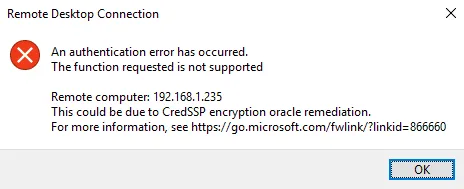
This applies to Windows client or server OS machines running on-premise or on public clouds, for example on Azure.
This error occurs if you are trying to establish an insecure RDP connection, and the insecure RDP connection is blocked by an Encryption Oracle Remediation policy setting on the server or client. This setting defines how to build an RDP session by using CredSSP, and whether an insecure RDP is allowed.
Solution
Section titled “Solution”As per the relevant MS KB article, you will need to patch both the connecting client and the receiving machine with the appropriate CredSSP patch, based on the installed OS version. Check the update history for the following updates, or check the version of TSpkg.dll.
| Operating system | TSpkg.dll version with CredSSP update | CredSSP update |
|---|---|---|
| Windows 7 Service Pack 1 / Windows Server 2008 R2 Service Pack 1 | 6.1.7601.24117 | KB4103718 (Monthly Rollup) |
| KB4103712 (Security-only update) | ||
| Windows Server 2012 | 6.2.9200.22432 | KB4103730 (Monthly Rollup) |
| KB4103726 (Security-only update) | ||
| Windows 8.1 / Windows Sever 2012 R2 | 6.3.9600.18999 | KB4103725 (Monthly Rollup) |
| KB4103715 (Security-only update) | ||
| RS1 - Windows 10 Version 1607 / Windows Server 2016 | 10.0.14393.2248 | KB4103723 |
| RS2 - Windows 10 Version 1703 | 10.0.15063.1088 | KB4103731 |
| RS3 - Windows 10 1709 | 10.0.16299.431 | KB4103727 |
Source
Section titled “Source”https://support.microsoft.com/en-us/help/4093492/credssp-updates-for-cve-2018-0886-march-13-2018