How to convert RDS per-user to RDS per-device CALs
You need to convert existing Microsoft RDS per-user CALs to RDS per-device CALs or vice-versa. This article provides guidance on how to convert RDS per-user to RDS per-device CALs. Also you may want to refer to the following article if you need to troubleshoot RDS licensing issues: https://docs.cloudschool.ai/kb/how-to-troubleshoot-microsoft-rds-licensing-issues/
Solution
Section titled “Solution”You can convert RDS per-user to RDS per-device CALs or convert RDS per-device to RDS per-user CALs by utilizing the RDS licensing manager console (MMC console). Follow the steps below.
- In the RDS licensing manager console, expand the record which corresponds to the existing RDS licenses you wish to convert and right click on this record.
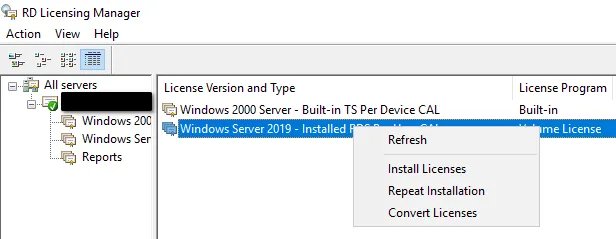
-
Choose “Convert licenses”.
-
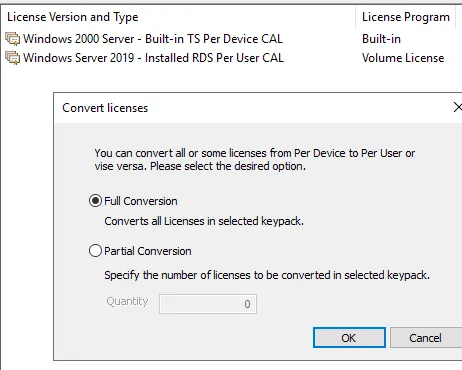
Choose between full and partial conversion and click “OK”.
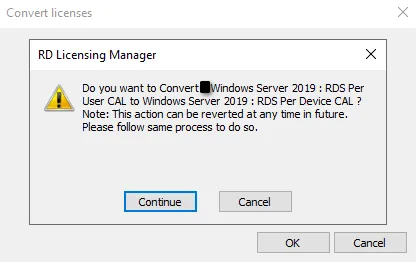
- Confirm the requested conversion by clicking “Continue”.
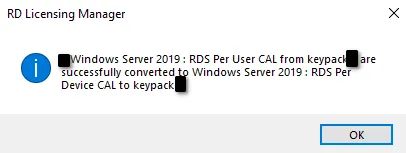
- RD Licensing manager will provide a confirmation message for successful RDS CAL type successful conversion.